
Midjourney Prompts Guide: From Basics to Pro Workflows
The popular advice to keep adding “cinematic,” “beautiful,” and “highly detailed” to a Midjourney prompt mistakes decoration for control. Those words may change a picture, but they don’t tell the model which subject matters, where it belongs, or how the image should be framed. A prompt that sounds vivid can still leave the important decisions unresolved.
A more reliable Midjourney prompts guide starts with a different premise: prompting is a version-aware design process. State the visual goal, separate descriptive text from parameters, and test changes one at a time. That won’t guarantee a perfect image. It will make it easier to understand why one generation worked and another didn’t.
Table of Contents
- Why Most Midjourney Prompt Advice Is Already Outdated
- Anatomy of a Midjourney Prompt That Actually Behaves
- Parameters, Weights, and the One-Variable-at-a-Time Test Loop
- Keeping a Character or Brand Look Consistent Across Generations
- Commercial Use, Rights, and the Preflight Checklist Most Guides Skip
- Diagnosing the Four Prompt Failures You Keep Making
- A Repeatable Workflow You Can Actually Run This Week
Why Most Midjourney Prompt Advice Is Already Outdated
A prompt copied from an old gallery post can fail for a simple reason: it was written for a different model. Midjourney’s public release history includes version 2 in April 2022, version 3 on July 25, 2022, version 4 alpha on November 5, 2022, version 5 in March 2023, versions 5.1 and 5.2 in May and June 2023, version 6 on December 20, 2023, version 6.1 on July 30, 2024, and version 7 on April 3, 2025. Version 7 became the default on June 17, 2025, according to the Midjourney release history.
That timeline matters in practical work. A model update can change how a prompt handles composition, realism, style, text, or parameters. A template that worked for version 5.2 isn’t a permanent recipe. Without checking the active version, you may blame your wording for a difference caused by the model.
Three habits that make results easier to repeat
- Check the active model. Confirm which version you’re using before you evaluate a prompt or reuse an old example.
- Change one thing at a time. If you rewrite the subject, alter the aspect ratio, and add a reference all at once, you won’t know which change affected the result.
- Keep a record of working prompts. Save the model version, descriptive text, parameters, and reference settings together. That turns a lucky render into something you can test again.
Those habits replace the search for magic adjectives with a small, practical feedback loop. You don’t need to treat every generation like a mystery. Decide what needs to improve, change the smallest relevant part, then compare the outputs.
The best question isn’t “What words make Midjourney produce better images?” It’s “What does this model need to know, and which control should I test to get it?”
Anatomy of a Midjourney Prompt That Actually Behaves
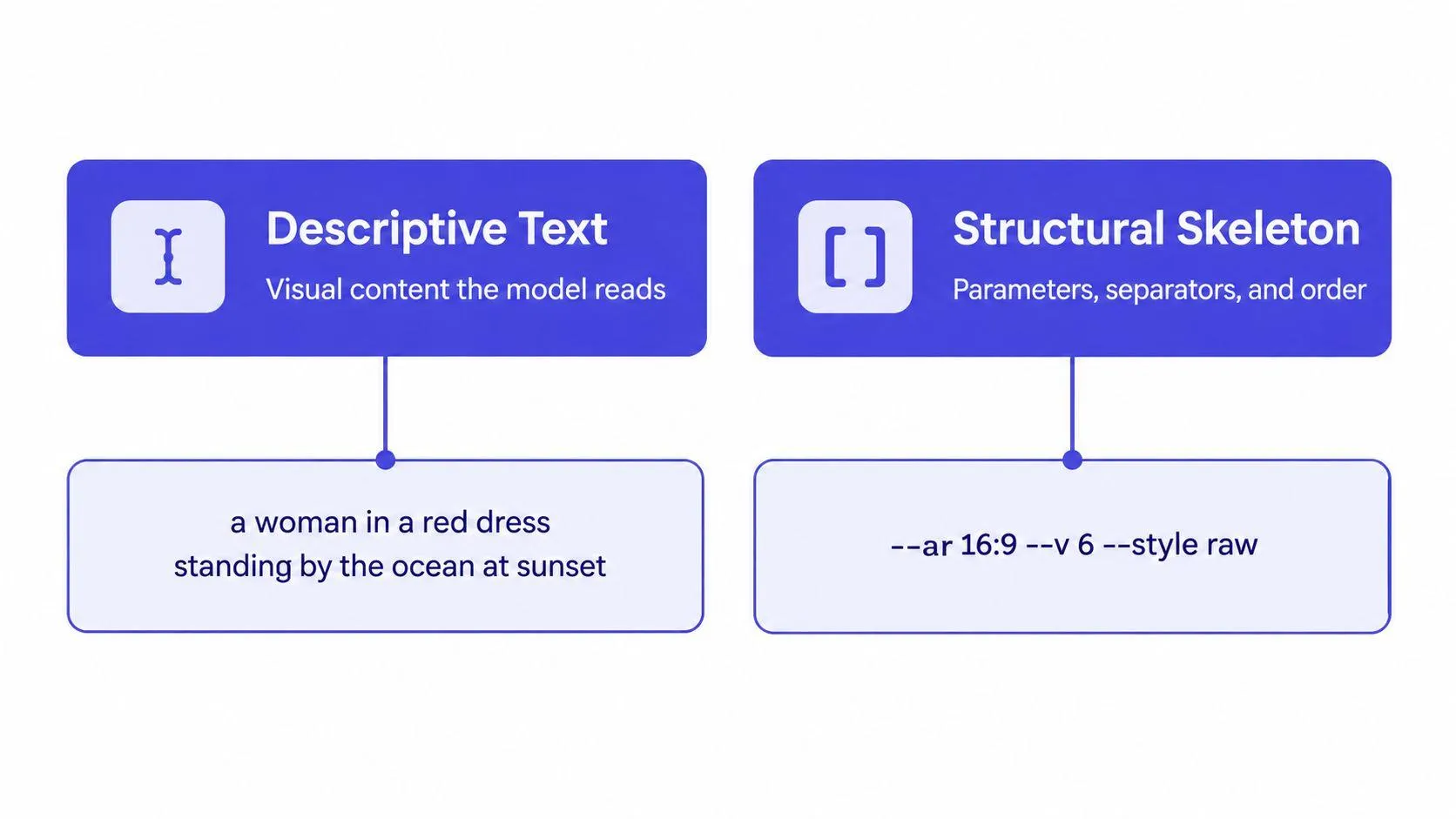
A reliable prompt has two layers. First comes the descriptive text, which names the visual content. Then come the parameters, which act as controls and belong at the end. Midjourney’s prompt basics documentation says parameters follow the descriptive text, separated by a space, without punctuation inside the parameter syntax.
The descriptive layer works best when it identifies the main subject, action, environment, composition, lighting, and medium. Not every prompt needs all of those details. Include the ones that affect the image you’re trying to make, and put the focal subject first so it doesn’t compete with incidental detail.
The control layer is not more descriptive prose. An aspect ratio changes the shape of the image; an image weight changes how strongly a reference image influences the result. Midjourney’s parameter documentation explains that parameters are special instructions appended after the text prompt.
Rewrite for control, not ornament
Before: “Beautiful cinematic cafe, amazing light, detailed, stylish.”
After: “A ceramic espresso cup on a small marble table, quiet cafe interior, close-up composition, window light from the left, editorial product photography –ar 4:5”
The second prompt tells Midjourney what to show and how to frame it. “Beautiful” and “amazing” don’t specify a visible feature, so they leave the model to fill in the gaps.
Before: “Cool robot in a city, futuristic, dramatic.”
After: “A single repair robot crossing a rain-wet street at night, low-angle wide shot, neon shop signs reflected in pavement, graphic novel illustration –ar 16:9”
The rewrite narrows the subject and gives the setting and composition a job. It doesn’t pile on more adjectives; it replaces vague evaluation with visual instructions.
Before: “Portrait of a woman, fashion, elegant.”
After: “A woman wearing a structured cream coat, waist-up portrait, centered against a warm gray studio backdrop, soft side lighting, minimalist fashion editorial –ar 3:4”
Here, clothing, framing, background, and lighting do the work that “elegant” can’t do on its own.
| Layer | Weak Prompt | Well-Structured Prompt |
|---|---|---|
| Descriptive text | “Beautiful product, stylish” | “Glass perfume bottle on a stone plinth, close-up, soft side light” |
| Parameters | Controls mixed into the prose | --ar 4:5 appended after the description |
A useful prompt-writing primer on AI image prompts can help you practice this split. When a result disappoints, inspect the two layers separately: the visual brief may be vague, or a control may be missing or misplaced.
Parameters, Weights, and the One-Variable-at-a-Time Test Loop
Parameters are useful when they answer a specific production question. For most client images, start with aspect ratio because it affects the composition from the outset. A banner and a vertical mobile creative need different framing, so use --ar to target the delivery format rather than planning to crop every result afterward.
Other controls are worth testing when they solve a defined problem. Stylize affects how strongly Midjourney’s default aesthetic influences the result; chaos can help explore variation; weird can push results away from familiar visual territory. You don’t need to adjust all of them on every job. A control without a question behind it adds complexity, not clarity.
Reference weights matter when a reference is part of the brief. For image prompts, --iw sets how strongly the image influences the output. In versions 7, 6, and Niji 6, its default is 1 and its allowed range is 0 to 3; a higher value gives the reference greater influence, according to Midjourney’s image prompt documentation. Check the documentation for the active version before reusing a setting.
Run a clean comparison
- Lock the brief. Keep the subject, action, setting, and composition constant.
- Choose one variable. Compare, for example, two aspect ratios or two stylize settings, not a bundle of changes.
- Generate comparable options. Keep the wording and other controls unchanged.
- Record the result. Note which output better fits the brief and why.
- Move to the next variable. Change only after you’ve made a decision about the previous test.
Practical rule: If the prompt changes in several places at once, treat the result as exploration, not evidence.
The version switcher is part of the toolkit, not an afterthought. Model behavior and parameter support can evolve, so check version-specific documentation instead of assuming a familiar flag works the same way everywhere. The point isn’t to memorize every parameter. It’s to know which control addresses the problem in front of you, then test it cleanly.
Keeping a Character or Brand Look Consistent Across Generations
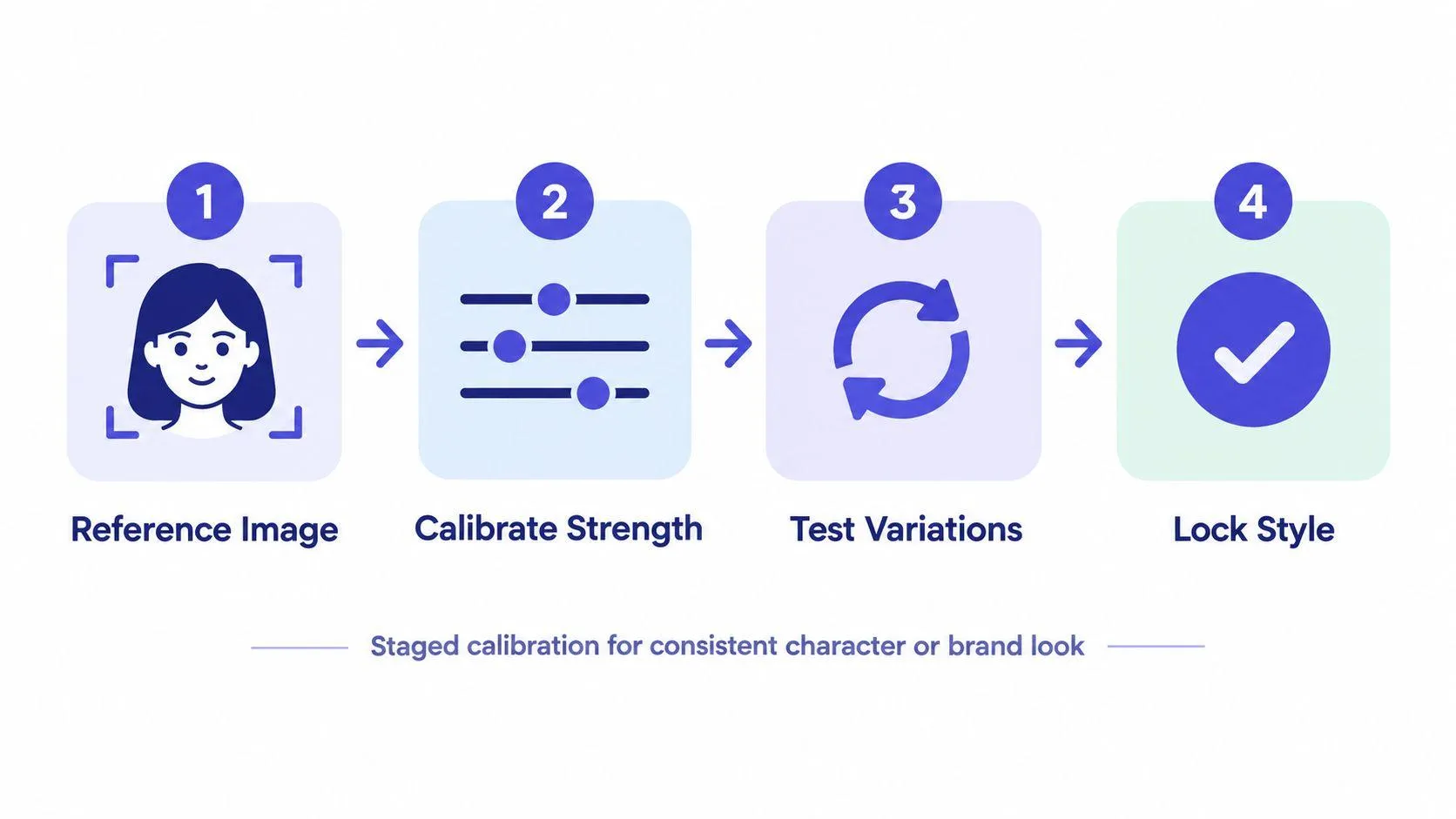
For a campaign, a good-looking single image isn’t enough. You need the character, product, or visual language to hold together across different scenes. That calls for staged calibration, not maximum reference strength from the start.
Suppose you’re building a campaign around a fictional bicycle brand. Begin with a clean reference that shows the look you want. Write a text-only prompt for one scene, such as the bicycle against a studio backdrop, and save that result as the baseline. Then add a reference mechanism and change nothing else. If the output drifts, you can test whether the issue is the reference, its strength, or the original wording.
Choose the reference for the job
A Style Reference (--sref) transfers visual characteristics such as color, texture, medium, and lighting. It’s useful when the campaign needs a shared visual language but the scene or subject changes. Its strength control, --sw, ranges from 0 to 1000, with a default of 100, according to Midjourney’s Style Reference documentation. A higher setting isn’t automatically better. It may overpower the image’s own content, so compare values while keeping the wording fixed.
A Character Reference uses --cref with an image URL. Its --cw setting controls how much character detail carries over. The default, --cw 100, attempts to preserve details such as face, hair, and clothing; --cw 0 shifts the emphasis mainly to the face, as described in Midjourney’s Character Reference documentation.
For version 7, Omni Reference (--oref) is intended to bring a referenced character, object, vehicle, or creature into the generated image. Its weight control, --ow, ranges from 1 to 1000 and defaults to 100. These tools serve different purposes: --sref carries a look, while --oref is intended to preserve a referenced subject or object.
The calibration method is simple: establish a text-only baseline, add one reference type, then vary its weight without changing the prompt. Test the result across a fixed set of campaign scenes and assess subject fidelity, composition, style match, and visible artifacts. Don’t judge consistency from the strongest-looking single image. Judge whether the approach holds up across the set.
Commercial Use, Rights, and the Preflight Checklist Most Guides Skip
A polished image isn’t automatically ready for a client. Platform permission, ownership, and copyright protection are different questions. Midjourney’s commercial-use documentation says subscribers own the images and videos they create, but an upscaled image created by another user remains that creator’s property and requires permission. It also says businesses with annual gross revenue above $1 million must use a Pro or Mega plan for commercial use, and notes that copyright rules differ by country. Consult the commercial use documentation and seek legal advice for a specific situation.
That distinction matters in client work. A service’s terms may allow commercial use without guaranteeing exclusive or enforceable copyright protection in every jurisdiction. Nor does an attractive result settle whether the reference material, likeness, or brand elements were cleared for the job.
Before the image leaves your desk
- Trace the references. Use original or licensed source images, and keep a record of where they came from.
- Check the account plan. Confirm the applicable plan before accepting commercial work, especially if the business falls under the documented revenue threshold.
- Write brand-safe constraints. Specify approved colors and avoid trademarks unless they’re authorized. Treat generated copy as a separate review problem rather than assuming lettering will be reliable.
- Review likeness and style risks. Don’t use a living person’s likeness or request a living artist’s distinctive style for commercial work without checking the legal and client context.
- Get permission for someone else’s creation. Don’t assume an upscale or shared image is yours to deliver.
- Document human edits. Keep track of source assets, generated images, edits, approvals, and the final file sent to the client.
A prompt can specify the image you want. It can’t replace clearance, review, or a rights check.
Diagnosing the Four Prompt Failures You Keep Making
Most disappointing results come from a prompt that leaves too much room for interpretation, not from a shortage of adjectives. Start by looking for structural problems.
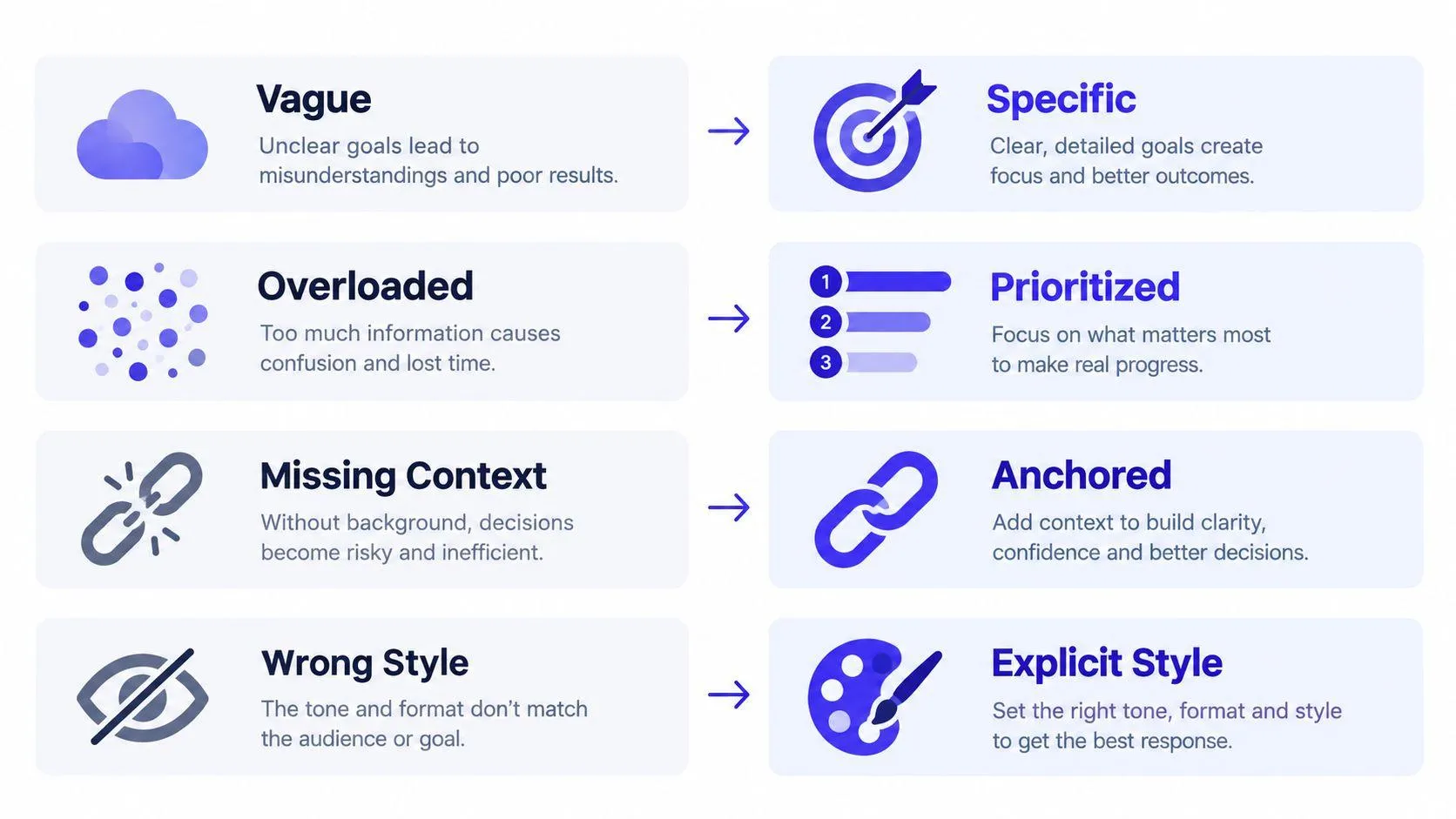
- Vague style words. “Beautiful, cinematic portrait” describes a reaction, not a shot. Rewrite it as “waist-up portrait, dark studio background, hard side light, monochrome editorial photography.” The habit: name visible choices.
- Too many competing subjects. “A chef, a crowded kitchen, two customers, a dog, a market, and a neon sign” gives the model several possible focal points. Rewrite it around one subject: “A chef plating a dish at the pass, close composition, kitchen blurred behind.” The habit: choose the focal subject before adding secondary details.
- Parameters buried in the prose. A control placed among descriptive words can blur the distinction between the image brief and the technical settings. Put the description first, then append parameters after a space. The habit: read the prompt once for content and once for controls.
- Advice from the wrong version. An old example may rely on behavior or parameter support that has changed. Check the active model before copying it, then compare your result against a version-aware baseline. The habit: save the model version with the prompt.
These fixes aren’t a guarantee of success. They make failures easier to diagnose. If a prompt still misses after you’ve clarified the subject and separated the controls, change one variable and test again rather than adding another layer of adjectives.
A Repeatable Workflow You Can Actually Run This Week
Use this workflow on the next image brief:
- Check the active Midjourney version and note it with the prompt.
- Write the descriptive text: subject, action, environment, composition, lighting, and medium where relevant.
- Add parameters at the end, starting with the aspect ratio for the intended delivery format.
- Run a small comparison, changing one variable at a time.
- Score outputs against the brief, then expand the approach only after it holds up.
For an internal benchmark, build a fixed 20–50-prompt test set and score each output for subject fidelity, composition, style match, and artifact rate. Report mean scores and failure counts rather than relying on a single “success rate.” That gives your team a way to challenge its own assumptions without pretending there’s a universal benchmark.
If you’d rather clarify the brief before writing it, Midjourney prompt generators offer another starting point.
Prompt Like A Pro interviews you about a task, then produces a structured prompt for tools including Midjourney, so you can define the brief before testing parameters. Try it on your next image project at Prompt Like A Pro.
Ready-made prompts for this
Build yours with the wizard
Prompt Like A Pro asks a few questions about your task, then writes a complete prompt for ChatGPT, Claude or Gemini. Free, no signup.
Make a prompt →Read next
Is Claude Better Than Gemini in 2026? An Honest Guide
Claude and Gemini compared on benchmarks, pricing, context windows, privacy and the same prompt sent to both, with a pick for each situation.
Read the guide →