
Pros and Cons Analysis That Actually Works
You’ve got two job offers open on your laptop. One promises more room to grow; the other seems safer. You’ve listed the advantages and disadvantages, but every reread leaves you defending whichever offer you preferred that morning.
A useful pros and cons analysis should do more than record that hesitation. It should help you explain what matters, check what you know, and decide what would make you choose differently.
Table of Contents
- When a Simple List of Pros and Cons Is Not Enough
- Where Pros-and-Cons Thinking Comes From
- Write Each Pro and Con Like Orwell Would
- The Four-Column Template That Forces Honest Comparisons
- The Biases That Quietly Wreck Balanced Lists
- Upgrading to a Weighted Matrix Without False Precision
- Running a Sensitivity Check Before You Commit
- Your Editable Checklist and How AI Can Help
When a Simple List of Pros and Cons Is Not Enough
A quick list can make a difficult choice look settled. One job offers interesting work, a better title, and a flexible schedule. The other offers a familiar manager, clearer duties, and less disruption.
Yet the entries don’t answer the question you face. Is the flexible schedule written into the offer? Does the better title come with useful experience? Would leaving your current employer close a door you still need?
The problem isn’t that you forgot an advantage. It’s that you haven’t distinguished an attractive description from a reliable condition.
Replace the tally with a decision question
Start with a sentence that names the choice and its purpose: Choose the role that supports my career goals without creating an unacceptable household risk. That sentence gives you a way to reject irrelevant arguments.
Then ask:
- Importance: Which considerations could decide the choice on their own?
- Evidence: What supports each claim, and what remains unconfirmed?
- Commitment: What would you have to undo if the choice went badly?
- Conditions: What must be true before you can accept either option?
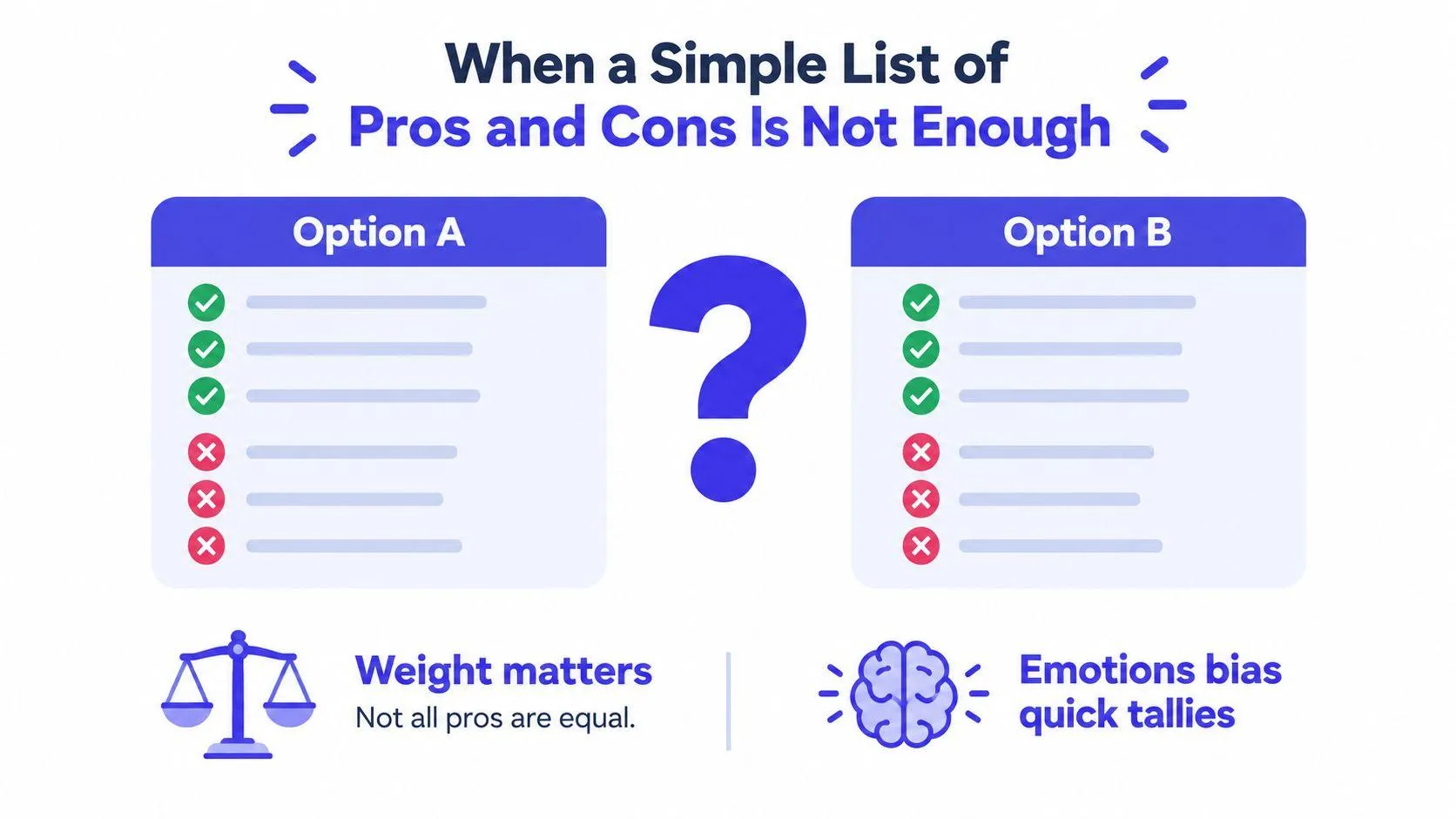
The illustration captures why matching columns don’t necessarily produce a useful answer.
For a workplace choice, a defensible product-roadmap decision brief provides a useful format for moving beyond isolated arguments. Write the decision, constraints, alternatives, and reasons together, so another person can inspect the reasoning.
Practical rule: Don’t count arguments until you’ve decided what makes an argument important.
A short comparison can still be enough for an easy, reversible choice. But a consequential decision needs more structure. Plain-language editing, weighted scoring, and a sensitivity check help you turn a persuasive list into a recommendation you can defend.
Where Pros-and-Cons Thinking Comes From
Structured comparison didn’t begin with a spreadsheet. Its business history connects to SWOT, the framework for organizing strengths, weaknesses, opportunities, and threats.
A historical review of SWOT’s development traces related work to Harvard Business School in the early 1950s, describes explicit discussion of internal and external factors by the early 1960s, and identifies a 1963 business-policy conference as an important milestone. That lineage helps explain the appeal of making competing considerations visible before choosing a strategy.
SWOT and a pros-and-cons list aren’t identical. SWOT sorts factors by their relationship to an organization; a pros-and-cons list sorts them by their apparent effect on a choice. Still, both give people a shared place to put arguments they might otherwise discuss separately.
Organizing thought is not predicting outcomes
Consider a hypothetical team deciding whether to build a customer-support tool. Its experienced developers are an internal strength. Uncertain customer demand is an external condition.
Those statements belong in different categories because the team can influence them differently. Hiring or training might address an internal weakness. Testing demand might clarify an external uncertainty.
| Factor | Useful question |
|---|---|
| Internal capability | What can we change ourselves? |
| External condition | What must we investigate or prepare for? |
| Claimed advantage | Under what conditions would it help? |
| Claimed disadvantage | How serious would the consequence be? |
The historical review also criticizes SWOT’s vagueness and oversimplification. A category can organize an argument without establishing its importance, likelihood, or predictive value.
That distinction matters in a meeting. Everyone may agree that an option offers greater flexibility while meaning different things by flexibility. One person means easier scheduling; another means freedom to change suppliers.
The format’s strength is organizational clarity, not prediction. Keep the shared map, but don’t mistake agreement about the labels for agreement about the decision. Before recommending an option, define what each label means and identify the conditions under which it matters.
Write Each Pro and Con Like Orwell Would
Weak wording makes weak reasoning harder to spot. Creates significant efficiencies sounds positive, but it names neither the work nor the person who benefits.
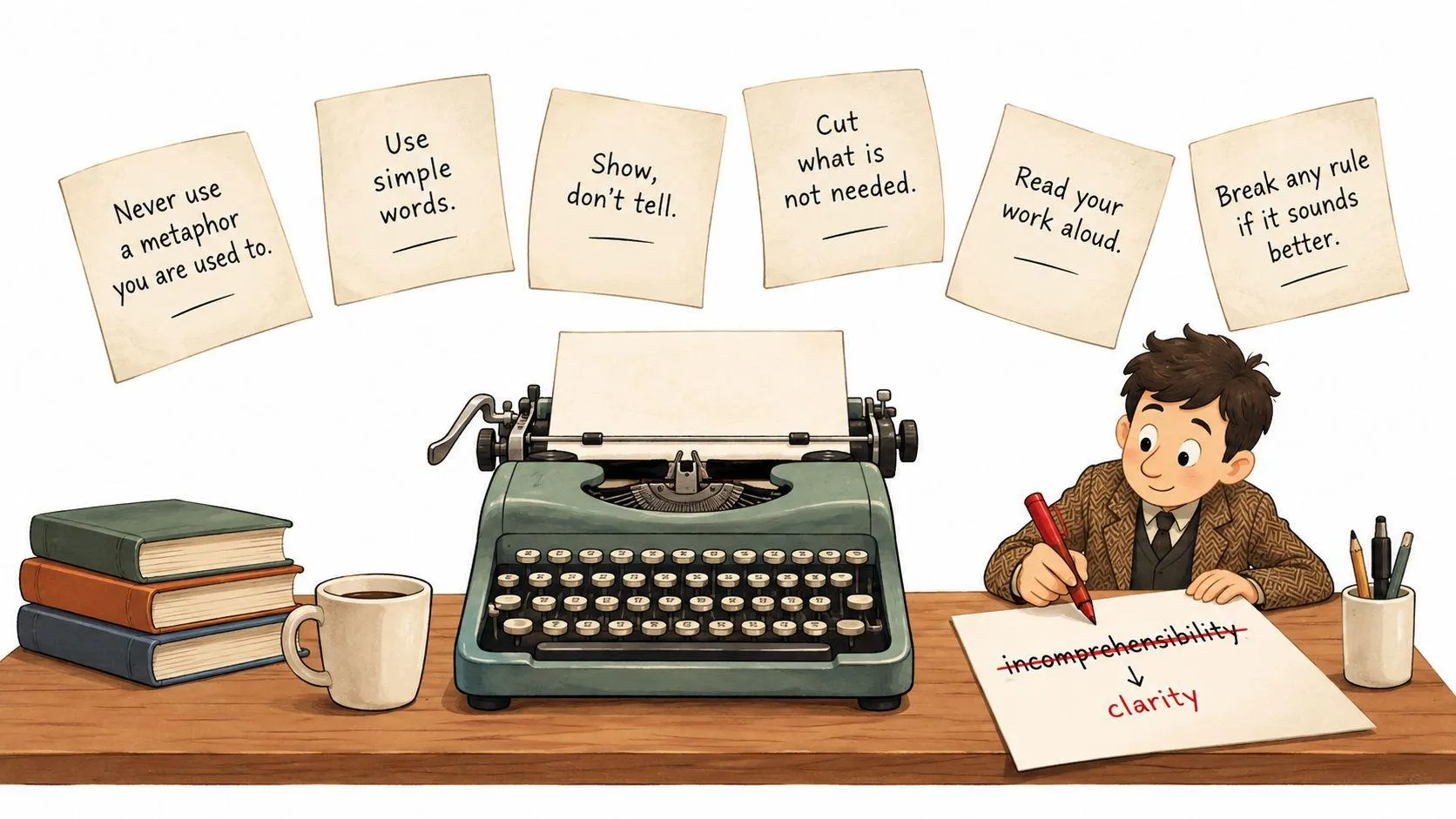
George Orwell offered six rules in his 1946 essay, “Politics and the English Language”. Applied to a comparison, they form an editing checklist rather than a demand for literary style.
The image below introduces the habit: revise the claim, not just its tone.
Edit for meaning before polish
These are illustrative rewrites, not claims about a particular product:
- Avoid worn-out metaphors. Replace This tool is a game changer with This tool combines drafting and review.
- Choose a short word when it works. Replace Facilitates collaboration with Helps colleagues edit together.
- Cut words that add nothing. Replace There is a potential possibility of delays with Setup may delay launch.
- Prefer active voice. Replace Extra checks will be required with Editors must check factual claims.
- Replace jargon with everyday English. Replace Optimizes cross-functional alignment with Helps sales and support agree on priorities.
- Break a rule rather than distort meaning. Keep data retention when that’s the precise issue. Define it instead of replacing it with an inaccurate simplification.
The U.S. Department of State’s plain-writing guidance supports subject-verb-object sentences and defining uncommon terms, including acronyms, at first use. The supplier stores customer files gives readers more to examine than Storage considerations apply.
Washington State’s plain-language guidelines recommend sentences under 20 words and paragraphs under six sentences as practical targets. Don’t force those limits when a qualification prevents a misleading claim.
Finish by circling every vague adjective: easy, secure, better, affordable. Replace each with a condition you can check, or mark it as an unresolved judgment. A clean sentence can still be wrong, but it gives you something definite to verify.
The Four-Column Template That Forces Honest Comparisons
A conventional list might say Assistant A saves time and Assistant B protects privacy. Neither entry tells you whether the claim holds, who benefits, or what happens after a mistake.
Use item, evidence, stakeholder, and reversibility as your core columns. Put the option name and consequence in the item column. This keeps the comparison compact without dropping its context.
The table below is a hypothetical comparison to complete, not a report of tested product features.
Two Options Compared Using the Four-Column Template
| Item | Evidence | Stakeholder | Reversibility |
|---|---|---|---|
| Assistant A may shorten revision work | Compare drafts using the same task and review standard | Writer and editor | A trial can stop; changes to the workflow may need undoing |
| Assistant A may create data-retention concerns | Check current terms and approved data categories | Client and data owner | Stopping use may not undo information already disclosed |
| Assistant B may fit the existing review process | Ask reviewers to complete a representative task | Editor and project manager | Usually reversible if original files remain available |
| Assistant B may require more manual formatting | Record the steps needed to prepare an acceptable draft | Writer and publisher | Reversible, but unfinished work still needs attention |
Evidence tells you what to check next. A demonstration, contract term, observation, and personal preference aren’t interchangeable. Write not tested when that’s the honest answer.
Stakeholder prevents you from calling a choice efficient merely because someone else does the extra work. A writer might save effort while an editor takes on more verification.
Reversibility asks about the consequence, not just the purchase. Cancelling access is different from recovering confidential material or reversing a public commitment.
Add context without adding columns
Above the table, record the deadline, decision owner, and unacceptable outcomes. Within each item, note the relevant time horizon and uncertainty where they affect the choice.
For a money-related comparison, a side-by-side financial decision prompt can help you frame the alternatives consistently. Keep the same questions for both options rather than investigating your favorite more generously.
The template is ready to copy. Replace the illustrative rows with your own claims, attach supporting material, and leave gaps visible. An empty evidence cell is a research task, not permission to assume the claim is true.
The Biases That Quietly Wreck Balanced Lists
Equal space for each option doesn’t guarantee fair reasoning. You can write a tidy comparison while selecting evidence that protects a preference you’ve already formed.
A review of cognitive biases in professional decision-making identified approximately a dozen biases across four occupational areas, with overconfidence reported most often. Structure alone doesn’t remove the errors people bring to it.
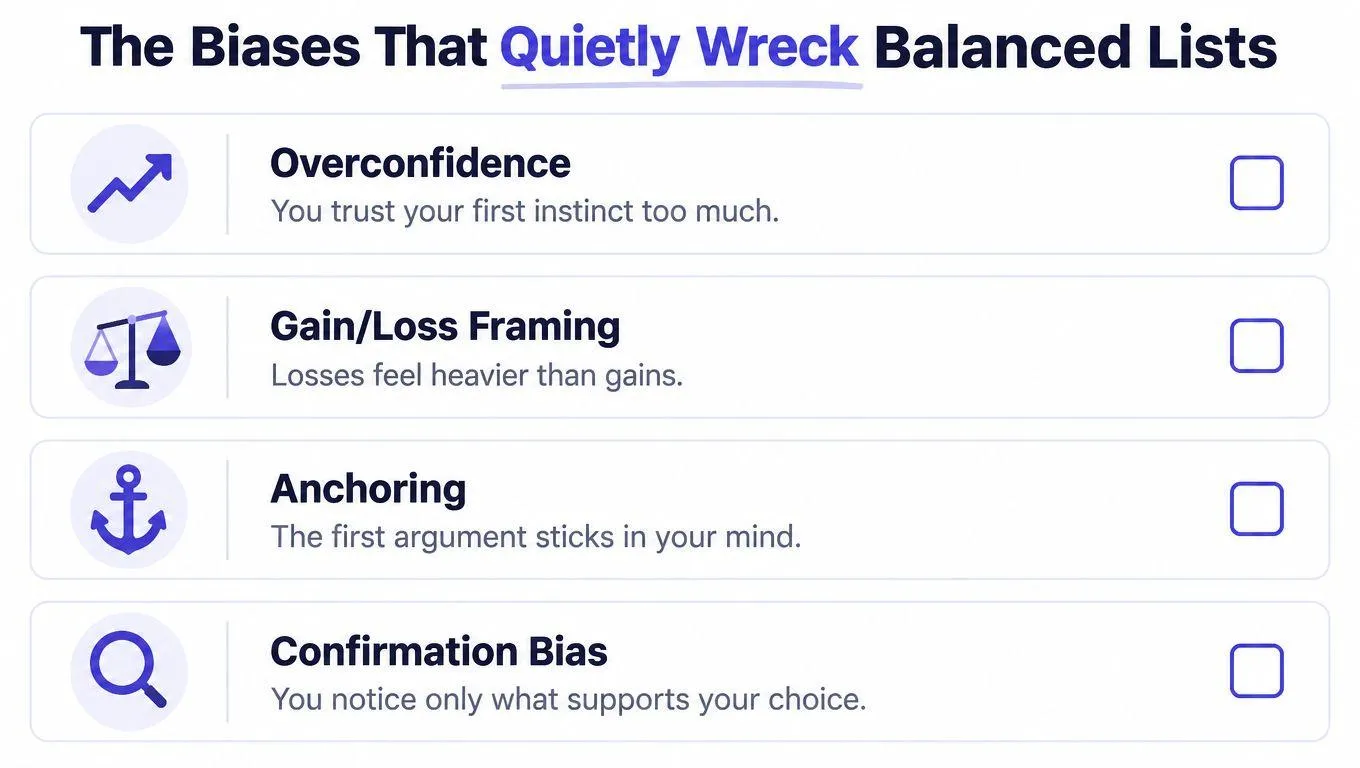
Use these labels to examine your own draft, not to diagnose everyone who disagrees with you.
Recognize the error in ordinary decisions
- Overconfidence: You treat a successful demonstration as proof that an assistant will handle your full workload.
- Gain/loss framing: You describe one job as gaining freedom and another as losing security, without comparing the underlying conditions.
- Anchoring: You let the first salary figure set the terms for every later judgment.
- Confirmation bias: You collect praise for your preferred tool while dismissing contrary experiences as irrelevant.
Research on decision-making under pressure finds that extreme time pressure amplifies gain/loss framing effects and cognitive load increases decision noise. Don’t treat a rushed first draft as a settled recommendation.
A safeguard checklist helps you interrupt those habits:
- Label assumptions: Separate what happened from what you expect.
- Seek contrary evidence: Look for a credible reason your preferred option might fail.
- Write a pre-mortem: Suppose the decision went badly. Describe the plausible cause.
- Set a reversal condition: State what evidence would change your conclusion.
If nothing could change your mind, you’re writing a defense, not a comparison.
Plain language supports this work because it exposes the assumption. The team will adopt the tool quickly invites a direct question: what makes you expect that?
Upgrading to a Weighted Matrix Without False Precision
A basic list tells you which consequences you’ve identified. A weighted matrix adds your stated preferences and a consistent way to assess alternatives.
Multi-criteria decision analysis (MCDA) compares options across different dimensions without requiring you to turn every consequence into money. A systematic review of MCDA describes its value for clarifying stakeholder preferences and evidence gaps, while emphasizing that it cannot replace deliberation and judgment.
The diagram shows the calculation, not proof that any particular weight is correct.
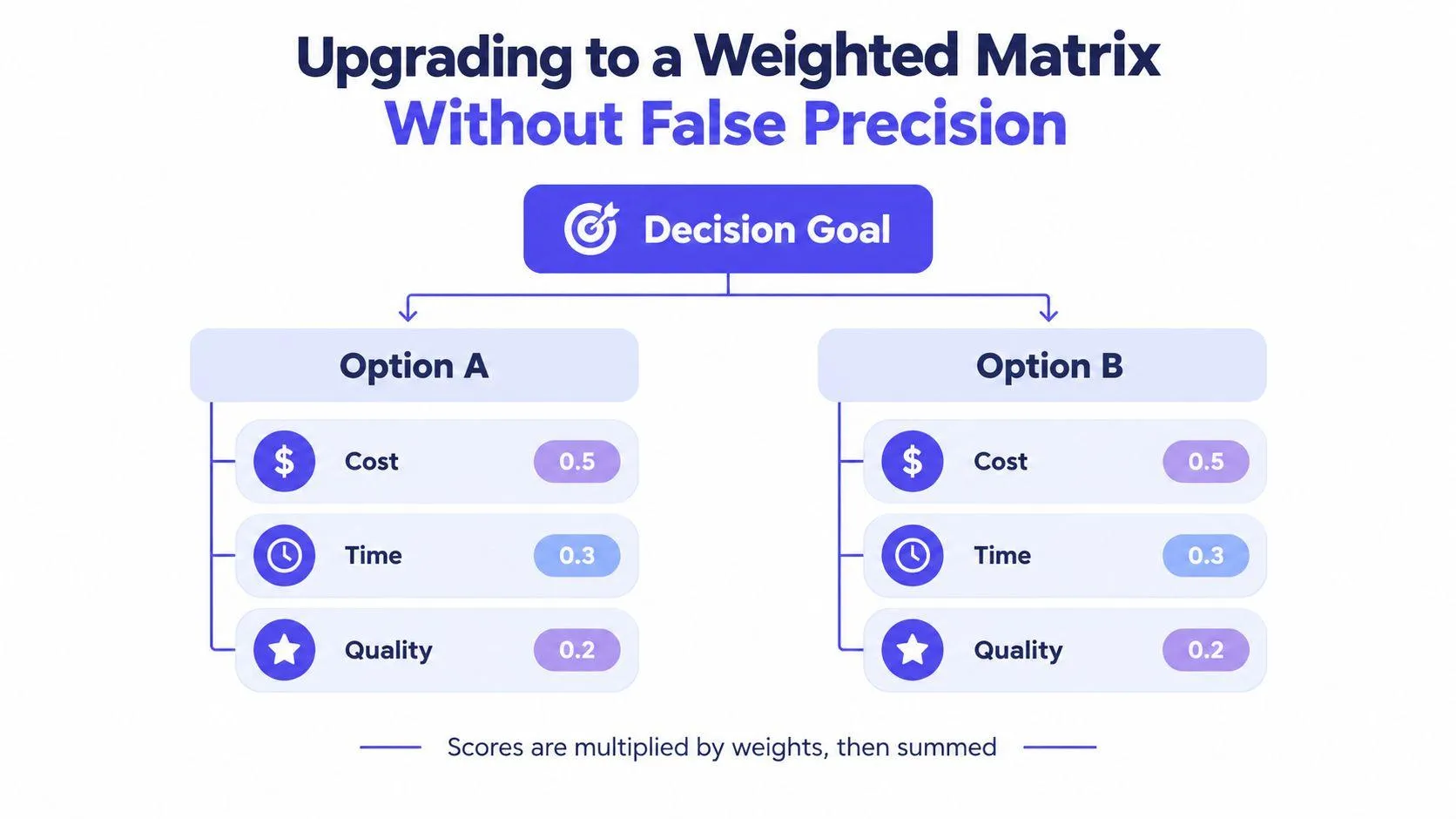
Work through the comparison
For the hypothetical assistants, use criteria such as output quality, revision time, model compatibility, data-retention risk, and switching cost. Define each criterion before assigning a weight.
| Criterion | Evidence to assess | Question for the weight |
|---|---|---|
| Output quality | Review both drafts against the same acceptance standard | How much does an unacceptable draft matter? |
| Revision time | Record work needed to reach that standard | How important is editing effort? |
| Model compatibility | Test the required format and workflow | Is compatibility essential or convenient? |
| Data-retention risk | Check terms and permitted uses | Is this a trade-off or a veto condition? |
| Switching cost | List migration and training tasks | How disruptive would adoption be? |
Suppose your tests favor Assistant A on revision time and Assistant B on compatibility. Give each option a score using a defined scale, multiply each score by its criterion weight, and add the weighted scores. Document the evidence and rationale alongside the result.
This is a worked method, not an invented product ranking. Without actual test results and agreed weights, there’s no defensible numerical winner.
Keep the arithmetic accountable
A legal or privacy requirement may be a pass/fail constraint, not a disadvantage that stronger performance can offset. Remove an ineligible option before calculating preferences.
Use parallel wording for remaining effects: reduces review effort, increases setup effort, supports the required format. The U.S. Office of Personnel Management’s plain-language guidance recommends parallel construction and readable formats.
The matrix makes judgments inspectable and repeatable. It doesn’t make subjective weights objective. Explain why the winner ranks first, and name the uncertainty that could change that result.
Running a Sensitivity Check Before You Commit
Your matrix may favor Assistant A because you expect less revision work. Before committing, ask how much of that expected advantage could disappear without changing the decision.
Sensitivity analysis means changing uncertain inputs and observing what happens to the conclusion. EFSA’s guidance on uncertainty analysis describes sensitivity and influence analysis as ways to examine how solid the findings are and identify uncertainties worth resolving; illustrative checks can reduce expected revision-time savings by 10%, 25%, and 50%.
Those percentages are test assumptions, not measured performance claims. Apply each reduction to the same baseline estimate, then reassess the revision-time score while initially keeping other inputs fixed.
Read the result as a decision rule
| Scenario | What you change | What you record |
|---|---|---|
| Baseline | Nothing | Preferred option and reason |
| Smaller expected saving | Revision-time estimate | Whether the ranking changes |
| Much smaller expected saving | The same estimate again | Whether further testing is necessary |
| Different stakeholder priority | A relevant weight | Whether preferences explain the disagreement |
If Assistant A stays ahead across plausible scenarios, you have a better-supported recommendation. If a modest adjustment changes the winner, you have a fragile recommendation and a clear reason to gather better evidence.
A threshold statement should come from your actual recalculation. For illustration only, using the assumptions linked above: Option A remains preferable unless implementation exceeds 30 hours or expected revision reduction falls below 20%. Don’t use those example thresholds as if you discovered them in a test.
Decision note: Record the point where the recommendation changes, not just the option that currently wins.
Know what the check cannot repair
Changing inputs won’t fix an omitted requirement or unreliable evidence. It also won’t prevent double-counting when criteria overlap, such as rewarding shorter editing time under both speed and productivity.
Save the assumptions with a date and a short explanation. When real usage evidence arrives, replace estimates and rerun the comparison. Write the conclusion in direct sentences: We assumed this. We tested that. We’ll reconsider if this condition changes.
Your Editable Checklist and How AI Can Help
A sound decision routine should be easy to reuse. Keep it beside the comparison rather than relying on memory when you’re tired or under pressure.
Copy this decision checklist
- Define the choice: Name the alternatives, purpose, owner, and deadline.
- Classify the commitment: Identify what can be reversed and what cannot.
- Name affected people: Include those who bear costs without making the decision.
- Attach evidence: Mark unresolved claims instead of filling gaps with confidence.
- Challenge the preference: Complete the pre-mortem and reversal condition.
- Test the ranking: Run the sensitivity check on the uncertain inputs that matter.
- Schedule review: Decide what new evidence will trigger another assessment.
AI can help you complete that routine, but generating more arguments isn’t the same as improving judgment. Ask an assistant to find missing constraints, separate claims from assumptions, and challenge the strongest reason for your preferred option.
Ask for questions before recommendations
Use a prompt like this:
Help me compare these alternatives. Ask about my constraints, stakeholders, evidence, and reversibility before recommending anything. Label uncertainty, identify disconfirming evidence, and explain which assumptions could change the conclusion. Don’t invent scores or supporting facts.
Check the response against independent material. For high-impact choices, use appropriate human review rather than treating fluent prose as verification.
KPMG’s global 2025 research found that 73% of respondents experienced AI benefits, while 79% remained concerned about risks and 43% reported negative outcomes such as inaccurate results, privacy loss, or misinformation. Benefits and reasons for caution can coexist.
The final recommendation should be brief enough to use: name the preferred option, explain the decisive trade-off, and state the condition that would change your mind. Plain writing, weighted scoring, and sensitivity analysis belong together because each lets another person inspect a different part of your reasoning.
Prompt Like A Pro offers a free, questions-first prompt generator that turns task details into a structured prompt for an AI assistant. Visit Prompt Like A Pro to build a comparison prompt that asks about your constraints, evidence, and trade-offs before drafting a recommendation.
Ready-made prompts for this
Build yours with the wizard
Prompt Like A Pro asks a few questions about your task, then writes a complete prompt for ChatGPT, Claude or Gemini. Free, no signup.
Make a prompt →Read next
10 Prompt Engineering Tips for Better AI Output in 2026
Ten prompt engineering tips for better AI output: roles, labels, examples, output format, step-by-step reasoning, sources and testing, compared side by side.
Read the guide →