
7 Claude AI Prompts for Better Results
The popular advice says you need secret Claude-only prompts to get better results. You don’t. A well-built prompt can work in ChatGPT, Claude, or Gemini. The Claude-specific advantage lies in how you format the request, especially when you separate instructions, context, examples, and constraints with clear XML-style tags. Anthropic’s guidance recommends this structure because labeled sections help Claude parse complex prompts more clearly, while examples can improve consistency. Anthropic’s Claude prompting guidance supports the use of descriptive tags such as <instructions>, <context>, and <input>.
The seven examples below adapt reliable prompt patterns for Claude without claiming that any prompt belongs only to Claude. Judge each pattern by context quality, output control, repeatability, and review needs. A clear structure can reduce confusion, but you still need to check the result, especially when the task involves code, research, hiring, or sensitive business decisions.
Table of Contents
- 1. Job Description Writing with Role and Context Tags
- 2. Listicle and Bullet-Point Generation with Item Examples
- 3. Email Copy with Audience and Tone Specification
- 4. Code Review and Debugging Prompts with Code Context and Error Specification
- 5. Research Synthesis and Literature Review Prompts with Source Type and Scope Tagging
- 6. Social Media Post Generation with Platform and Engagement Objectives
- 7. Meeting Notes and Action-Item Extraction with Role and Outcome Tags
- 7-Point Comparison of Claude AI Prompts
- Turn Good Prompts Into Repeatable Workflows
1. Job Description Writing with Role and Context Tags
A vague request such as “Write a job ad for a designer” leaves too much unsaid. Claude has to guess the seniority, company culture, audience, tone, and length. A tagged prompt gives each detail its own place.
Practical rule: State the role level and the company context before asking for the job ad.
Use a prompt like this:
<role>You are an experienced HR manager.</role>
<context>I'm writing a job ad for a junior graphic designer at a 10-person agency.</context>
<instructions>Write the job ad. Keep it friendly and plain, no buzzwords.</instructions>
<constraints>Under 250 words. Don't mention salary.</constraints>
<output_format>A short intro, then "What you'll do" and "What we're looking for" as bullet lists.</output_format>
The <role> tag sets the point of view. The <context> tag supplies concrete details about the employer and position. The instruction explains the task, while the constraints protect the tone and length. The output format tells Claude what the finished page should look like.
This pattern suits an early-stage company writing its first job posting, a founder describing a new team role, or an agency hiring an entry-level creative. Replace broad phrases such as “fast-growing environment” with facts about team size, working style, reporting lines, and daily responsibilities. Those details give Claude material to use.
Keep similar roles in separate prompts. A junior designer and a mid-level designer need different expectations, even if the company uses the same template. Put the most important instruction last. Claude tends to give extra weight to the final constraint, so end with the rule you most want it to follow.
2. Listicle and Bullet-Point Generation with Item Examples
Listicles often fail because the writer specifies only the subject and item count. “Write 7 time-saving tips for freelance designers” doesn’t tell Claude how long each tip should be, what information it should include, or how the items should differ.
A stronger prompt defines the shape, then shows one finished example:
<instructions>List 7 time-saving tips for freelance designers.</instructions>
<item_format>Each tip gets a bold one-line title, then 2 sentences: what to do and why it saves time.</item_format>
<example>
**Batch Similar Tasks:** Group emails, invoices, and client updates into set work periods. This reduces task switching and leaves longer blocks for creative work.
</example>
<constraints>No intro paragraph, no closing summary, no repeated tips.</constraints>
The example does more than demonstrate tone. It shows the required length, sentence rhythm, level of detail, and markdown style. Claude can copy that shape across the list without treating the example as another instruction when you isolate it inside <example> tags.
Specify an exact count, not “around 7.” Add negative constraints when the output tends to grow padding or repeat itself. You can find a practical structure for consistent bullet-point formats and adapt it to different audiences.
Craft the example carefully. If it sounds vague, every item may sound vague. Test one list before reusing the prompt for marketing copy, study advice, product release notes, or budgeting guidance. A list for finance writers should not use the same examples or assumptions as a list for educational content creators.
3. Email Copy with Audience and Tone Specification
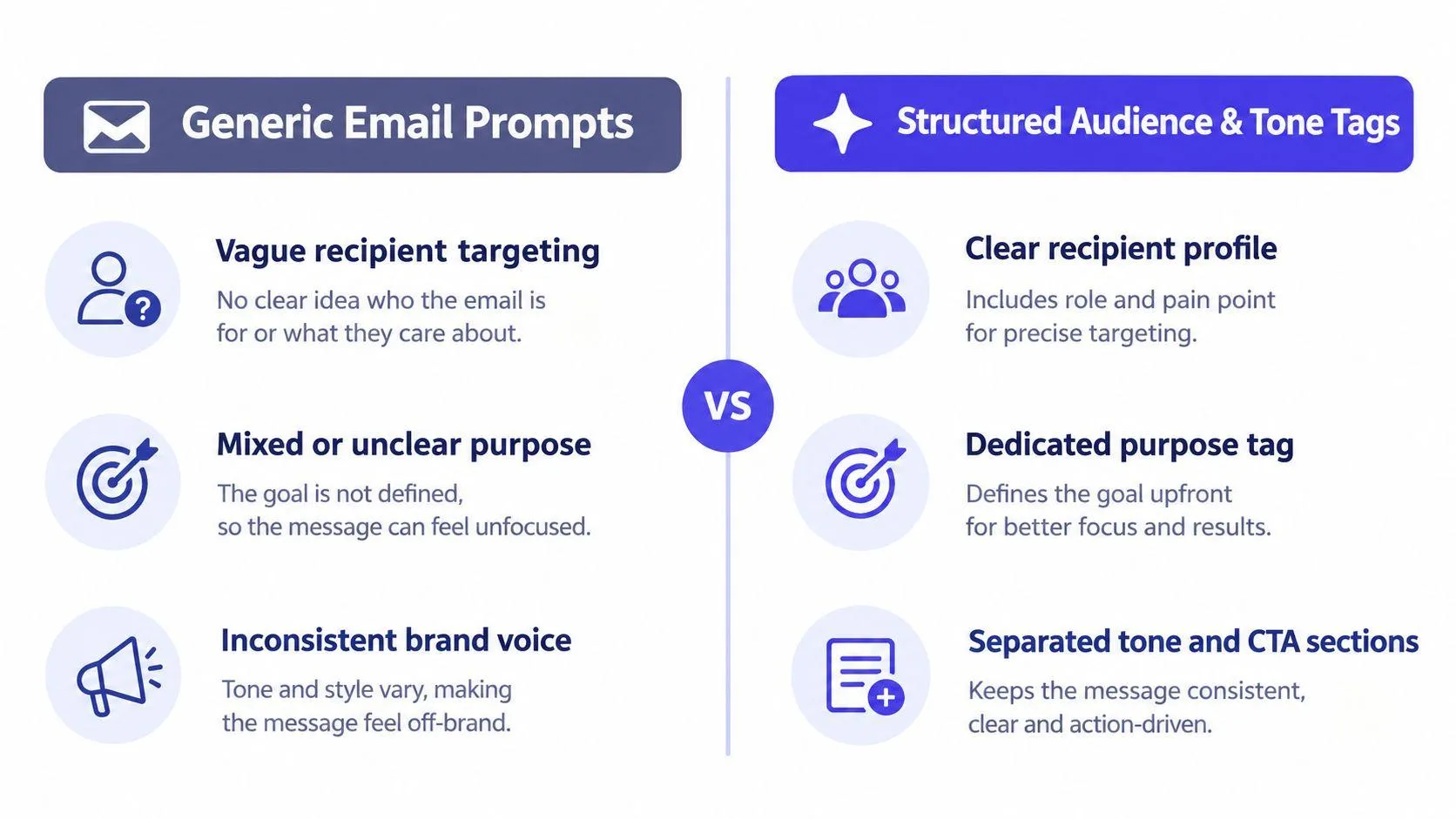
Email writing improves when you define the reader before you define the message. “Write a professional sales email” describes a broad category, not a real communication problem. A finance director worried about cost control needs a different message from a product user invited to give feedback.
Separate the key decisions:
<audience>Finance directors at growing software companies who need to reduce operating costs.</audience>
<purpose>Introduce our cost-audit service and invite the reader to discuss current challenges.</purpose>
<brand_voice>Friendly, informed, and practical. Never pushy or overly casual.</brand_voice>
<call_to_action>Ask the reader to reply with two suitable times for a short conversation.</call_to_action>
<output_format>Write 3 subject lines and one email under 180 words.</output_format>
<constraints>No salesy language, no fake urgency, no false personalization.</constraints>
The audience tag controls relevance. The purpose prevents the email from drifting into general company promotion. The voice and call to action resolve common conflicts, such as trying to sound warm while still asking for a direct response. The final constraints block habits that can damage trust.
This format works for sales outreach, investor updates, internal policy announcements, and feedback campaigns. For example, an HR team can change <audience> to “all employees affected by a new leave policy” and make the call to action “read the policy and submit questions.”
Keep the recipient’s current problem specific. “A VP of Sales worried about pipeline decline” gives Claude more direction than “a business professional.”
If the email belongs to a campaign, include the subject line in <output_format>. Separate a nurture email’s purpose from its voice, because “warm” doesn’t mean vague and “professional” doesn’t require stiff language. For more guidance on writing business emails, use the same questions-first approach before you draft.
4. Code Review and Debugging Prompts with Code Context and Error Specification
Claude can’t review code well if you hide the problem inside a large paste with no explanation. It needs the relevant code, the environment, the exact error, and a clear definition of the requested help.
Try this structure:
<code>
Paste only the function or component that causes the problem.
</code>
<environment>This is a Next.js 13 application using TypeScript.</environment>
<problem>Authentication fails after the form submits. The error says: [paste the exact message].</problem>
<task>Explain the likely cause, propose a fix, and identify any security risks.</task>
<constraints>Use async/await. Add no external dependencies. Explain each code change.</constraints>
<output_format>Diagnosis, corrected code, explanation, tests to run.</output_format>
The <code> section keeps the working material separate from the question. The environment prevents Claude from recommending tools or syntax that don’t fit the project. The exact error matters too. “It doesn’t work” invites a generic answer, while a stack trace gives Claude something precise to inspect.
This pattern helps a developer review React logic, debug Node.js middleware, inspect Python data operations, or troubleshoot a Kubernetes manifest. It also supports team standards. Add “Follow PEP 8,” “don’t use callbacks,” or “preserve the existing API” when those rules matter.
A security review needs a threat model. Say whether the code handles user-facing input, an internal admin tool, or a trusted service request. Claude may suggest a different level of validation and testing for each case.
Review every generated change yourself. A neat explanation doesn’t prove that the code runs, preserves existing behavior, or meets your security requirements.
5. Research Synthesis and Literature Review Prompts with Source Type and Scope Tagging
A research prompt should tell Claude what to synthesize, not merely ask it to summarize. A summary describes sources one by one. Synthesis compares their arguments, methods, evidence, and limits.
Use separate sections for the research question and the material:
<research_question>How do researchers argue for and against stricter AI regulation?</research_question>
<source_type>Peer-reviewed papers and policy reports.</source_type>
<source_material>
Paste the source notes, excerpts, or documents here.
</source_material>
<required_arguments>
Include arguments about innovation, safety, enforcement, minority viewpoints, and possible effects on employment.
</required_arguments>
<output_format>Write a structured synthesis with an introduction, thematic sections, disagreements, limits, and a conclusion. Use the requested citation style.</output_format>
<constraints>Don't invent sources or claims. Mark unsupported points for review.</constraints>
The source section matters because Claude shouldn’t be expected to know which documents you mean. List the sources or paste the relevant passages. If you need APA, Chicago, or an institutional style, specify it before drafting rather than trying to repair citations later.
This approach suits a thesis chapter, a competitive analysis based on reports, a policy brief, or journalistic background research. A product manager comparing competitor positioning can use <required_arguments> to force coverage of pricing, audience, product scope, and limitations.
Long documents need careful handling. Anthropic’s long-context prompting case study reports that contextual examples and a scratchpad produced the best performance in its comparison across long context lengths, while relevant-quote extraction improved accuracy with a small latency cost. In practice, ask Claude to identify and quote the evidence before it writes the synthesis.
For a large project, work in parts. Request literature trends first, methodological approaches next, and findings after that. This makes review easier and gives you a chance to correct a mistaken interpretation before it spreads through the whole document.
6. Social Media Post Generation with Platform and Engagement Objectives
A post for LinkedIn shouldn’t read like a shortened post for Twitter. The platform, audience, format, and desired action all change the writing.
Give Claude those choices explicitly:
<platform>LinkedIn</platform>
<audience>Engineering managers at Series A software startups.</audience>
<topic>What we learned from reducing deployment friction for product teams.</topic>
<engagement_goal>Invite comments and practical examples from other engineering managers.</engagement_goal>
<tone>Conversational, useful, and informed. Avoid corporate clichés.</tone>
<output_format>Write one post with a strong opening, short paragraphs, and a closing question.</output_format>
<constraints>Use no more than 5 hashtags. Don't make unsupported performance claims.</constraints>
A LinkedIn post may need a professional voice and room for a short argument. Twitter demands tighter copy, while Instagram may depend more on visual direction and caption structure. Discord and Slack posts often need a community tone rather than public-facing thought leadership.
Define the engagement goal precisely. “Get comments and replies” calls for a question or invitation to share experience. “Drive clicks to a blog” needs a different closing line. “Build trust” may call for a useful observation without a hard sell.
Use separate prompts when you adapt one idea across platforms. A Twitter thread doesn’t transpose directly to LinkedIn, and a caption designed for Instagram may need visual notes that don’t belong in a text-only post.
Hashtag limits can keep the result readable. You might request a maximum of 2 hashtags for Twitter and a maximum of 5 for Instagram. Also identify the audience in concrete terms. “Engineering managers at Series A startups” gives Claude a stronger target than “tech professionals.”
7. Meeting Notes and Action-Item Extraction with Role and Outcome Tags
A meeting summary can sound accurate and still leave the team with no clear next step. Ask for decisions, owners, deadlines, blockers, and risks as separate outputs.
<meeting_type>This is a sprint planning meeting for the backend team.</meeting_type>
<attendees>List the names and roles of everyone included in the notes.</attendees>
<source_notes>Paste the full transcript or detailed meeting notes here.</source_notes>
<task>Separate confirmed decisions, assigned actions, unresolved blockers, and risks. Don't turn suggestions into decisions.</task>
<output_format>
Decisions
Action Items, with owner and deadline
Blockers
Risks
Next Meeting Agenda
</output_format>
<constraints>Each action item must include a name and a deadline. Don't use "TBD" when the notes don't provide one. Mark missing information clearly.</constraints>
The meeting type gives Claude context. The task separates opinion from commitment, while the output format creates a document people can use without interpreting a loose summary. The constraint also prevents false certainty. If nobody agreed to a deadline, the answer should say that instead of inventing one.
This works for sprint planning, roadmap reviews, investor meetings, and retrospectives. A project manager can reuse the same structure each week, which makes changes in decisions, risks, and blockers easier to track.
Paste detailed notes when possible. Paraphrased notes may remove the wording that shows whether someone accepted an action or merely suggested it. Before sharing, redact salary information, legal advice, confidential strategy, or other sensitive material that Claude doesn’t need.
Review before sending: Confirm every owner, deadline, and decision against the original transcript.
A reusable prompt can save time, but it doesn’t remove responsibility. The meeting owner should check names and commitments before distributing the action list. Claude can organize what people said. It can’t confirm that a person agreed to work they never accepted.
7-Point Comparison of Claude AI Prompts
| Pattern | Implementation Complexity 🔄 | Resource & Speed ⚡ | Expected Outcome ⭐ / Impact 📊 | Ideal Use Cases | Key Advantages 💡 |
|---|---|---|---|---|---|
| Job Description Writing with Role and Context Tags | Medium, structured XML tags and explicit company details | Low–Medium resources (company details); fast single-pass output | ⭐⭐⭐⭐, hiring-ready, concise postings; reduces vague language 📊 | Small teams, startups, agencies hiring entry-level roles | Prevents buzzwords; enforces tone/length; role-weighted outputs |
| Listicle and Bullet-Point Generation with Item Examples | Low, supply exact format and one worked example | Moderate prep (craft example); very fast generation once set | ⭐⭐⭐⭐, highly consistent, repeatable items; easy repurposing 📊 | Marketing copy, educational content, release notes | Uniform formatting; eliminates intro bloat; scales well |
| Email Copy with Audience and Tone Specification | Medium, tag recipient, purpose, brand voice, CTA | Low resources (recipient + goal); fast for templates and one-offs | ⭐⭐⭐⭐, targeted, CTA-focused emails; fewer revision cycles 📊 | Sales outreach, investor updates, internal announcements | Clarifies recipient perspective; reduces brand-voice drift |
| Code Review & Debugging with Code Context and Error Spec | Medium–High, requires code snippet, error, and environment tags | Higher resource specificity (precise snippet); moderate speed, may need iterations | ⭐⭐⭐⭐, focused fixes and refactors; reduces hallucinations 📊 | Dev debugging, code reviews across languages, DevOps troubleshooting | Treats code as data; precise recommendations; respects constraints |
| Research Synthesis & Literature Review with Source Tagging | High, curate sources, state objectives, required arguments | High resource needs (source list); slower synthesis and verification | ⭐⭐⭐⭐, structured, citation-ready syntheses; balanced coverage 📊 | PhD theses, policy briefs, competitive analyses | Enforces scope and citations; prevents cherry-picking of evidence |
| Social Media Post Generation with Platform & Engagement Tags | Low–Medium, specify platform, goal, audience, hashtag rules | Low resources; very fast for copy (visuals handled separately) ⚡ | ⭐⭐⭐, platform-optimized copy; may lag on freshest trends 📊 | Founders, content marketers, community managers | Platform-specific formatting; tuned CTAs and hashtag constraints |
| Meeting Notes & Action-Item Extraction with Role/Outcome Tags | Medium, paste transcript, name attendees, define output format | Requires transcript or detailed notes; quick conversion to actions | ⭐⭐⭐⭐, actionable tasks with owners/deadlines; reduces follow-ups 📊 | Sprint planning, retrospectives, stakeholder syncs | Converts raw notes to executable items; enforces owners/deadlines |
Turn Good Prompts Into Repeatable Workflows
The best Claude AI prompts follow a simple sequence. Define the role, supply concrete context, state the task, describe the output shape, and add constraints. When consistency matters, include one finished example. Put the most important constraint last so Claude sees the rule at the end of the request.
XML-style tags work because they create visible boundaries. <context> holds facts about the situation. <instructions> states the work. <example> shows the desired shape. <constraints> protects limits and exclusions. Use descriptive names, keep them consistent, and nest them when the content has a clear hierarchy. That structure helps with job ads, emails, code reviews, research synthesis, social posts, and meeting notes.
A good prompt still needs a good review process. Check generated code by running tests and inspecting security implications. Check research against the source material and confirm every citation. Check hiring copy for accuracy, fairness, and legal requirements. Check emails and social posts for unsupported claims, accidental personalization, and the right call to action. Check meeting actions against the transcript before assigning work.
Anthropic’s newer guidance also points beyond one-off prompts toward more durable workflows, including Skills, Projects, MCP, and subagents. Its explanation of Skills describes prompts as reactive and temporary, which raises a useful question: should you keep rewriting the prompt, or turn repeated work into a reusable process? If your team performs the same research, coding, or document task often, a template with review steps may serve you better than a clever one-time request.
Prompt Like A Pro can help with that first stage. Its generator asks clarifying questions about the task, audience, format, length, and constraints, then formats the result for the selected AI tool. Its prompts work with Claude, ChatGPT, Gemini, and other assistants, and the service says it doesn’t store what users type on its servers.
Before your next prompt, check this short list:
- Role: Does Claude know the perspective to use?
- Context: Have you supplied the facts it needs?
- Task: Is the requested action precise?
- Format: Can you describe the finished output?
- Example: Would one completed example improve consistency?
- Constraint: Did you place the most important rule last?
- Review: Who will verify the result before anyone uses it?
Try Prompt Like A Pro to answer the missing questions behind your next Claude task and generate a structured prompt you can copy into the assistant. Use it for a job ad, email, code review, research brief, social post, or meeting action list, then review the output against the source material before publishing or sharing.
Build yours with the wizard
Prompt Like A Pro asks a few questions about your task, then writes a complete prompt for ChatGPT, Claude or Gemini. Free, no signup.
Make a prompt →